
Guides / Using Lumit / The application
Updated
Settings
Open the settings window from Edit ▸ Settings….
The search box in the title strip finds a setting by name on any page, and lists what it finds under the page names. On the Shortcuts page it searches the shortcuts instead.
Changes apply at once. Reset page, at the foot of the window, puts the page in view back to how it shipped. On Preview and cache it leaves the cache budgets and the disk cache’s place as they are.
General
Section titled “General”- Display: Language. Same as this machine follows the system’s.
- Shared projects: Footage upload limit and Footage download limit, the speed footage in a shared project moves at, from 128 KB/s up, or No limit.
- Workspace: Welcome screen on launch. New project template, a project that
every new one starts as a copy of: Choose… picks it and Clear goes back to an
empty project. After Effects presets turns a folder of
.ffxpresets into Lumit presets. Reset workspace puts the current arrangement back to how it shipped. Discord status sets what Discord shows while Lumit is open: Off, Lumit only, or Project and composition, which adds the names of the open project and composition. Keep running in the background: closing the window leaves Lumit in the system tray, or the menu bar on macOS, where paired phones still see it. Open Lumit on the tray icon’s menu brings the window back and Quit Lumit ends Lumit. Opening Lumit again also brings the window back, which is the only way on a desktop with no tray, such as GNOME as it ships. Open Lumit when you sign in appears once that is on, and starts Lumit in the tray when you sign in to the computer. - Updates: Automatic updates checks for a new version at launch, at most once a day; downloading waits for a click. Nightly builds follows nightly builds instead of releases, and asks first. Nightly icon, on a nightly build on Windows or macOS, chooses between the nightly’s own icon and the regular one. This version names the build installed and what the last check found, beside the same update button as the Help menu. See Installation.
Account
Section titled “Account”The profiles on this machine, the Lumit account the one in use is signed in to, and what of it is synced. See Profiles and accounts.
Appearance
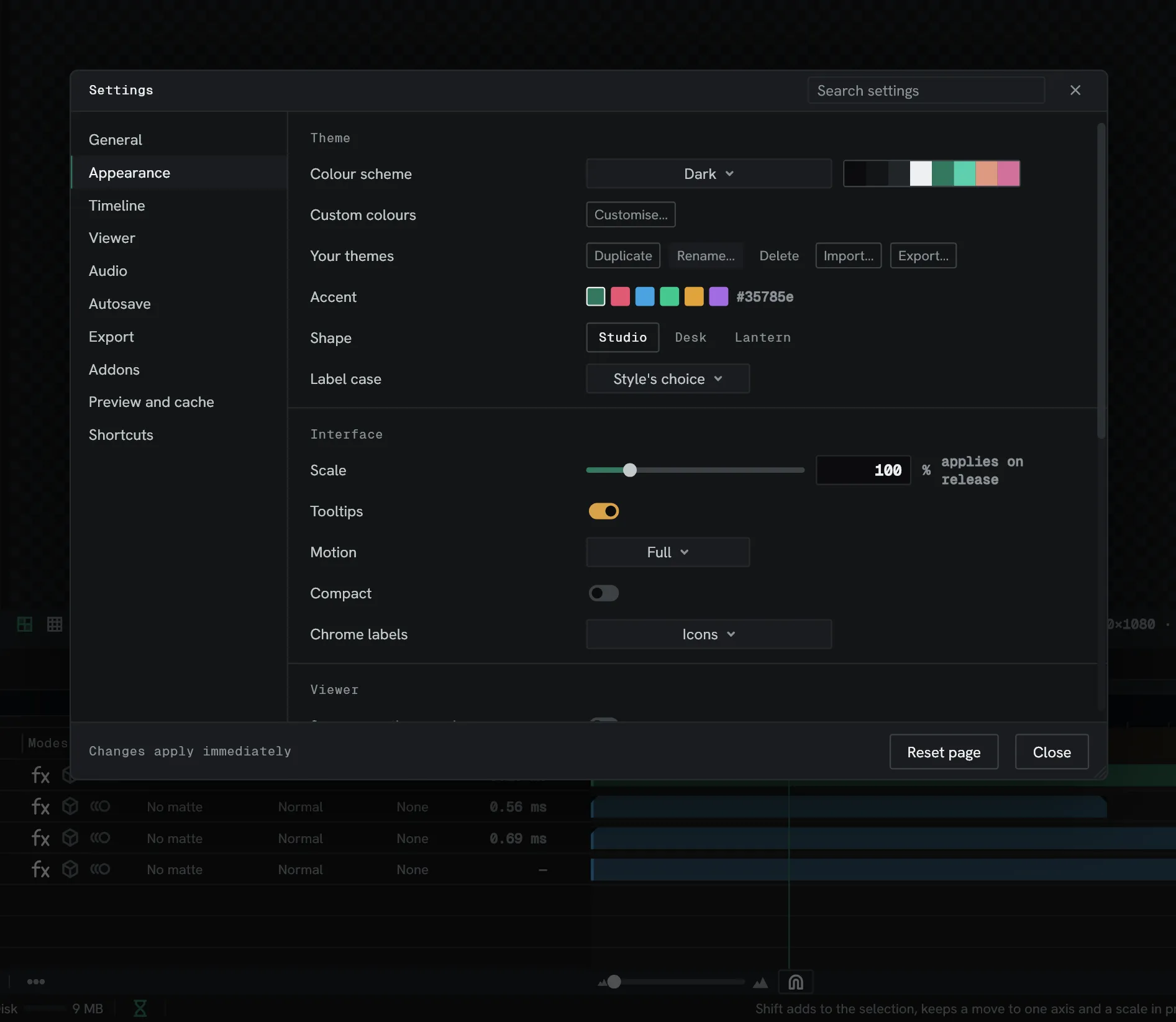
Section titled “Appearance”- Theme: Colour scheme offers 33 built-in schemes grouped dark and light, plus your own, and pointing at one previews it. Customise… opens the theme editor, and Your themes holds the ones you have made; themes can be exported and imported. Accent and Shape tune whichever scheme is in force. Shape is the interface style: Studio, Desk or Lantern. Label case sets how panel titles, headings and other labels are cased: Style’s choice, All caps, First letter or Lower case. Left to the style, Studio writes the first letter as a capital, Desk is lower case and Lantern is all caps. Room, shown with Lantern only, is Style’s choice, Day or Night.
- Interface: Scale, 75 % to 200 %. Tooltips, on or off. Motion, for how much controls animate: Full, Minimal or None. Compact, which tightens the row spacing throughout. And Chrome labels, deciding whether the bars carry Words, Icons, or Icons everywhere.
- Viewer: whether the scopes and an effect’s own graphs take the theme’s colours or their own, and whether the Surround behind the picture is Neutral or Theme colour. Viewer bars places the Viewer’s bars: Split, top and bottom, One bar, at the top, One bar, at the bottom or Deck. Toolbar position is Top or Left. Range sliders draws a track beside a ranged parameter’s number. Command box in the top line shows the search box that opens the command palette. On Linux, Lumit’s own title bar replaces the system’s, from the next start. Icon set draws the icons Regular, Engraved or Bold. Viewer bars, Toolbar position and Icon set can also be left to the Style’s choice. Custom icons reads your own icons from the folder it shows, one SVG per icon named after it, and counts how many it replaces; Reload icons reads the folder again.
- Panels: whether footage rows in the Project panel carry thumbnails, whether layer names are drawn on the lane bars, whether markers draw lines down the rows (Marker lines), and whether a minimap of the bars is drawn under the lanes (Minimap under the lanes, on by default in Lantern). Wires sets how each wire in a node graph runs between its two sockets: Curved, Angled, which turns only at 45 or 90 degrees, or Hanging, which droops like a slack cable.
- Waveforms: Style is Plain or Frequency, which splits the waveform into low, mid and high bands. Anchor draws it from the Centre or the Bottom.
Timeline
Section titled “Timeline”- Editing: whether Retime opens to the Speed lens rather than Value (Retime opens to Speed) and whether it reads in seconds, whether video is placed in a Sequence layer automatically, where a video’s sound goes in the Cut timeline, whether its tracks stand in any order, whether pasted layers keep their original time rather than pasting at the playhead, and whether the playhead stays where playback stopped. Several audio streams arrive as sets what a file with more than one audio stream becomes when placed: The first stream, One layer, mixed or A layer each. New expressions are written in JavaScript or Rhai; each expression keeps its own language afterwards.
- Panels: whether Transform appears in Effect controls, whether Effect controls shows its keyframes beside the parameters (Keyframes in Effect controls), whether an ease opens in a popup or the Easing panel, and whether sound dragged in the Cut or Audio timeline lands on whole frames (Sound moves in whole frames).
- Node graphs: whether a right-click,
TaborShift+Aon a node graph canvas opens node search. Each is on by default and can be turned off on its own.
Viewer
Section titled “Viewer”Whether the picture is smoothed when zoomed in, and whether the tone-map button appears on the Viewer bar. Turning the button off turns the tone map off too.
- Output device: System default, first in the list, follows the machine. A device chosen by name is used while it is connected; while it is not, Lumit plays through the system default and the row says so.
- Audio offset, −1000 to 1000 ms. Above zero holds the picture back for sound heard late, such as through Bluetooth headphones; below zero holds the sound back. It applies while playing, not to export, and is kept for this machine.
Autosave
Section titled “Autosave”How often a spare copy is written, and how many are kept. Setting the interval to nothing turns autosave off.
Export
Section titled “Export”What the export dialogue opens on: a preset, a filename template, and whether it asks for a destination each time or uses a folder you name.
Addons
Section titled “Addons”- Runtime: the Model runtime, with Install, or once installed Load now and Remove. The line under it says what it is running on, or that it would not load.
- Installed: each addon with its licence, size and what it does, and Remove. One with files missing says Files are missing.
- Available: Catalogue ▸ Check for addons lists what can be downloaded, each with its licence and size and Install, or Update for a newer version of one already here. Nothing installs before the runtime. Install from file installs from a manifest on disk. Where they are kept ▸ Show opens the folder.
- Extensions: each installed extension, with Show panel or
Hide panel, and Remove. Install from a folder takes the folder containing
extension.json. Extensions folder ▸ Show opens the folder.
Licence, on a row, opens that licence in the browser.
Preview and cache
Section titled “Preview and cache”- Playback: when the machine cannot keep up, every frame, or adaptive resolution. Full resolution while dragging draws a value drag at the Viewer’s own resolution rather than a reduced one.
- Hardware video decoding: on by default. If importing video freezes the computer, turn it off and open the project again.
- Render plugins on the graphics card: on by default. OFX plugins that support CUDA, OpenCL or Metal render on the graphics card.
- Largest picture: the widest and tallest picture Lumit makes, 8192 px by default. The list offers what this machine’s graphics card and memory can take. A frame cut to it shows Cut to the largest picture in the Viewer.
- Cache budgets for all three tiers: rendered frames in memory, preview frames on the graphics card, and frames parked on disk. Each shows what is In use, with Clear. The disk cache’s location is set here too (Where), for Everything or This project.
- Quality tier: the resolution playback has stepped down to, Full, Half, Third or Quarter. Reset starts it again at full.
- Resource governor: how much Graphics memory and Ordinary memory is in use against its budget, and how many requests it has turned away.
Shortcuts
Section titled “Shortcuts”Every command and its shortcut. Rebind by clicking one; conflicts are flagged. Keymaps export and import.
- Preset loads a whole keymap: Lumit’s own, After Effects or Vegas. The Vegas
one puts split on
S, snapping onF8, zoom on↑and↓and on the wheel with no key held, looping onQ, grouping onGandU, the Cut timeline’s switches onCtrl+L,Ctrl+Shift+XandAlt+F8, and sets Clip drags in Cut to Vegas. - After Effects shortcuts ▸ Import… reads a shortcut file saved by After Effects, the
.txtin itsaeksfolder. Commands Lumit has no match for are skipped. - Keyboard shows which keys have a shortcut. A filled key works anywhere and an outlined key works in one panel. Click Ctrl, Alt or Shift on it to see the keys they change, and point at a key to read what it does.
Dragging sets the modifier that breaks or joins handles in the
graph editor: Alt or Ctrl. Clip drags in Cut picks
Lumit default or Vegas drags for the Cut timeline.
A wheel action set to No key answers the wheel with no key held.