
Guides / Using Lumit / The application
Updated
Profiles and accounts
A profile is one person’s settings: appearance, shortcuts, panel layout, preferences, and saved easings, expressions and effect presets. A machine can hold several.
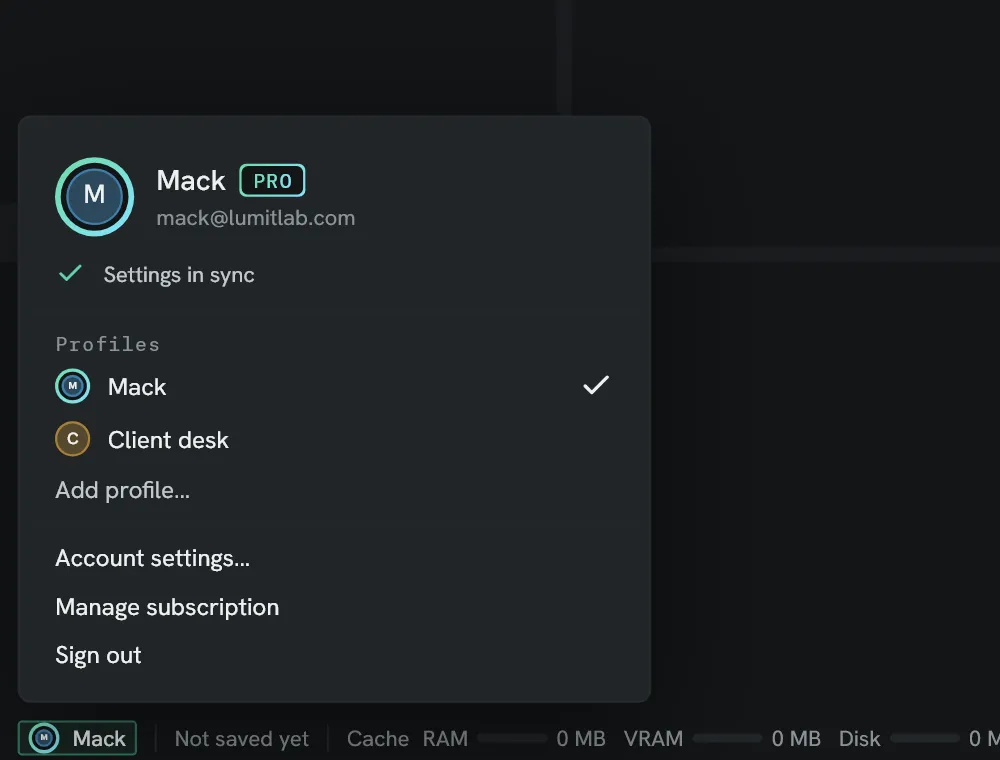
Profiles
Section titled “Profiles”The profile button is at the left of the bottom strip. It opens the profile card.
- A click on a profile in the card switches to it.
- Add profile… makes a profile from a name. It starts with the settings in force.
- Settings ▸ Account renames and removes profiles. The profile in use is not removed.
A profile does not hold the cache settings, the audio device, recent projects, or where windows were left. Those stay with the machine.
Lumit account
Section titled “Lumit account”An account is optional. Sign in in the profile card opens the sign-in window, which takes an email and a password, or Continue with Apple, Google or Discord where the server offers them. An Apple, Google or Discord sign-in finishes in the browser.
- Create an account asks for a name, an email, and a password of at least 10 characters, and emails a six-digit code that confirms the address.
- Forgot password? emails a code and takes a new password.
The password is not sent to Lumit’s server. Each profile signs in separately.
Settings ▸ Account ▸ Delete account… deletes the account, its synced settings, and any subscription.
Friends
Section titled “Friends”Friends are other Lumit accounts, found by username. A preview can be sent to a friend from the Previews window. Friends are free.
- Settings ▸ Account ▸ Username sets the name friends find you by: 3 to 20 letters,
numbers,
_or.. - Add friend asks someone by their username. They become a friend when they accept.
- An ask waiting for you shows Accept and Decline. The Friends row in the profile card counts them.
- Friends are folded under their count, such as Friends · 3. A press opens the list, and × beside a friend removes them.
Lumit Pro
Section titled “Lumit Pro”Lumit Pro is a subscription on a Lumit account. It adds:
- Shared projects through Lumit’s relay. See Relays.
- Sync.
- Projects kept online.
- Previews.
- Backup and history.
- Devices.
See what is in Pro in the profile card opens the Lumit Pro window. Get Lumit Pro opens the payment page in the browser, and the window changes when the payment completes. Manage subscription opens the page that changes or cancels it. A subscription bought in the iPhone app shows Managed on your iPhone on Settings ▸ Account instead.
Devices
Section titled “Devices”With Lumit Pro, Settings ▸ Account ▸ Devices lists This computer and the phones paired with the account.
| Control | What it does |
|---|---|
| Rename… | Renames the computer or phone, up to 40 characters. |
| Remove | Unpairs the phone. |
| Add a phone | Shows a QR code for the iPhone camera or the Lumit app, with the time it has left. New code replaces one that has run out. The window closes once a phone has paired, and Lumit names the phone. |
| Phones can start exports | On by default. Off, a phone can follow the export queue and change nothing. |
A paired phone follows this computer’s export queue, by name: the project’s name and each export’s file, never a path. It can:
- start the queue
- cancel or remove an item
- queue a composition with a saved export preset, over the work area or the whole composition, and start it
- send a finished export as a preview
A phone’s request is refused when Phones can start exports is off, when no project is open, when Settings ▸ Export ▸ Destination is Ask every time, Beside the project with an unsaved project, or A folder I choose with none chosen, and while a preview is already being sent. An export a phone starts never overwrites a file.
With Lumit Pro, a signed-in profile is also kept on Lumit’s server. Signing in on another machine brings its settings. A change is sent a few seconds after it is made and reaches the other machines within two minutes.
The first time a profile syncs on a machine, the settings on the server replace its own. After that, changes to different settings on two machines are both kept. Where two machines changed the same setting, the one that syncs last is kept.
Settings ▸ Account ▸ Keep this profile in sync turns sync off for the profile. Under it is a switch for each kind of setting.
| Kind | What it holds |
|---|---|
| Appearance and themes | Theme, accent, shape, and custom themes. |
| Shortcuts | The whole keymap. |
| Panel layout and workspaces | The arrangement in force and saved workspaces. |
| Preferences | The options on the other Settings pages, apart from those below. |
| Easings, expressions and favourites | Saved easings and expressions, favourite effects, and recent colours. |
| Effect presets | The files in the presets folder. |