
Reference / Effects / Generate
Updated
Connect points
Connect points is a Generate effect.

What it does
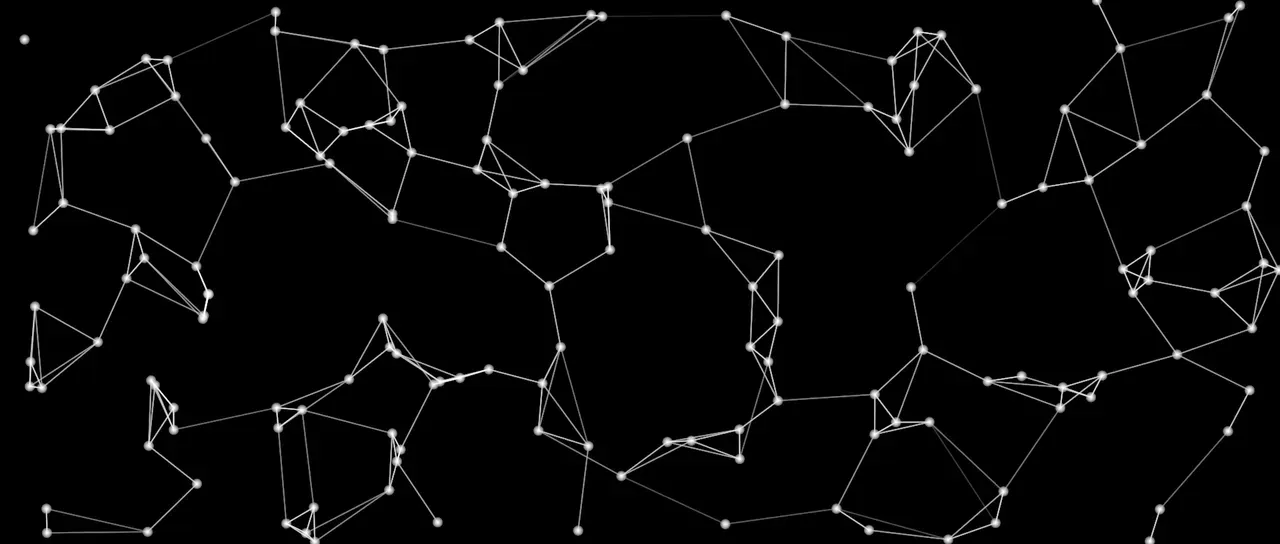
Section titled “What it does”Wire a producer’s Points socket into this effect and it joins the points with lines. Mode chooses which points are joined.
Distance is measured on the frame, or in 3D space with Depth on.
Each line takes the average of the colours of its two points. Colour multiplies this.
Parameters
Section titled “Parameters”| Parameter | Control | Range | Default | Unit |
|---|---|---|---|---|
| Mode | Dropdown | Nearby · In order · Triangles · Outline · Nearest | Nearby | - |
| Order by | Text | A short line of text | Empty | - |
| Between | Dropdown | All points · Picked · Picked and the rest | All points | - |
| From group | Text | A short line of text | Empty | - |
| To group | Text | A short line of text | Empty | - |
| Max distance | Slider | 0 to 1000; higher | 120 | Pixels at composition size |
| Max connections | Slider, whole numbers | 0 to 32; up to 64 | 4 | - |
| Closed | Checkbox | On or off | Off | - |
| Depth | Checkbox | On or off | Off | - |
| Taper | Slider | 0 to 100 | 0 | Per cent |
| Fade | Slider | 0 to 100 | 100 | Per cent |
| Width | Slider | 0 to 100; higher | 2 | Pixels at composition size |
| Feather | Slider | 0 to 100 | 100 | Per cent |
| Colour | Colour | Each channel 0 to 4, scene-linear | 1, 1, 1, 1 | - |
| Max points | Slider, whole numbers | 1 to 200000; up to 1000000 | 2000 | - |
| Mix | Slider | 0 to 100 | 100 | Per cent |
| Blend | Dropdown | Normal · Darken · Multiply · Colour burn · Linear burn · Darker colour · Add · Lighten · Screen · Colour dodge · Lighter colour · Overlay · Soft light · Hard light · Linear light · Vivid light · Pin light · Hard mix · Difference · Exclusion · Subtract · Divide · Hue · Saturation · Colour · Luminosity | Normal | - |
| Matte | Layer | Any layer in the composition | None | - |
| Invert | Checkbox | On or off | Off | - |
| Channel | Dropdown | Luminance · Alpha · Red · Green · Blue | Luminance | - |
In the Effect Controls panel:
- Connections groups Mode, Order by, Between, From group, To group, Max distance, Max connections, Closed, Depth, Taper, Fade.
- Line groups Width, Feather, Colour.
- Point groups Max points.
- Max connections is editable while Mode is anything but In order.
- Max connections is editable while Mode is anything but Triangles.
- Max connections is editable while Mode is anything but Outline.
- Max distance is editable while Mode is anything but Nearest.
- Closed is editable while Mode is set to In order.
- Order by is editable while Mode is set to In order.
- From group is editable while Between is anything but All points.
- To group is editable while Between is set to Picked and the rest.
- Matte is an input to an effect, scaling the strength. Invert inverts the mattes for calculating strength.
What each control does
Section titled “What each control does”- Mode: which points are joined. Nearby joins every pair closer than Max distance, up to Max connections at each point. In order joins each point to the next, in the order of the number each carries. Triangles draws a mesh of triangles over the points. Outline draws only the lines round the outside. Nearest joins each point to its closest few, however far off they are, and runs Taper and Fade from its shortest line to its longest.
- Order by: the name of the number In order sorts the points by. Left empty, it is the number each point carries. See Names.
- Between: which points a line may run between. Picked joins picked points only. Picked and the rest joins a picked point to one that is not. See Pick points.
- From group: the group Picked reads, and the first of the two that Picked and the rest joins, as a name. Left empty, it is the picked points. A point is in a named group while the name reads above 0.5.
- To group: the second of the two groups that Picked and the rest joins. Left empty, it is the points that are not picked. The same name in both joins that group to itself.
- Max distance: how far apart two points may be and still be joined. A longer line is dropped in every mode but Nearest.
- Max connections: the most lines that may meet at any one point, in Nearby. In Nearest it is how many neighbours each point reaches for.
- Closed: joins the last point of In order back to the first.
- Depth: measures Max distance between the points themselves in all three axes, rather than between where the camera puts them on the frame. The two differ only on a 3D layer with a camera.
- Taper: how much a line thins as it lengthens.
- Fade: how much a line fades as it lengthens.
- Width: the thickness of a line.
- Feather: how soft a line’s edge is.
- Colour: multiplies the colour each line inherits from its two ends.
- Max points: the most points that this effect operates on, newest points first.
- Mix: how much of the result replaces the picture underneath.
- Matte and Invert drive the strength of the effect from another layer’s brightness. See Effects.