
Guides / The panels
Updated
Effect Controls
Effect Controls lists every effect on the selected layer in the order they are composited.
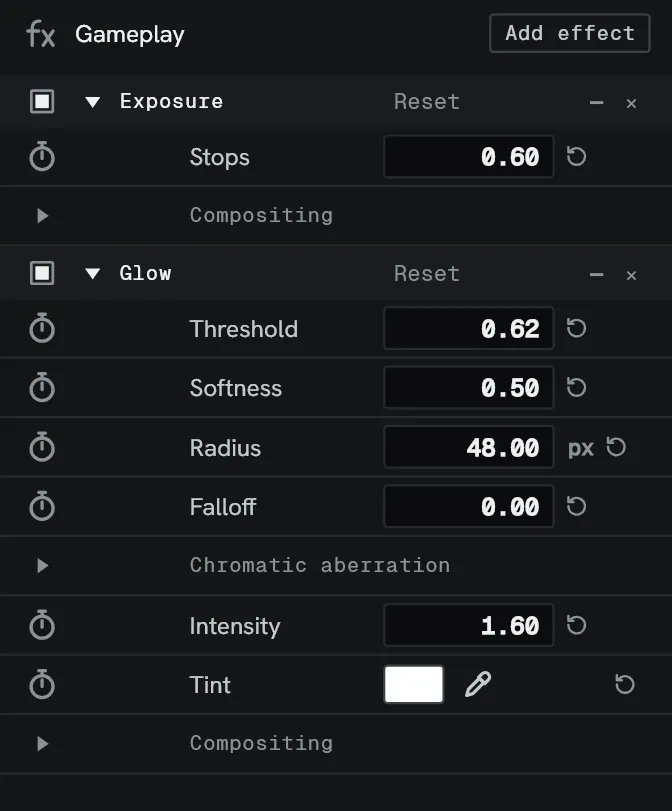
| Item | What it does |
|---|---|
| Parameter widgets | Sliders, dials, colour pickers, dropdowns, point controls. |
| Stopwatch | Start animating and keyframing a parameter. |
| Keyframe strip | A small timeline at the right of the panel that spans the selected layer, or the selected clip, with a lane of keyframes beside each parameter. Keys select, drag and delete as they do in the Timeline, and a click on its ruler moves the playhead. The diamond in the header shows or hides it, and the divider sets its width. In a panel under 560 pixels wide the ruler runs across the top and each animated parameter has its lane beneath it. Ctrl-click on an animated parameter’s lane adds a key, and right-clicking a key gives Delete key. An effect’s heading shows every key the effect carries as marks. With the playhead past the layer’s span, it stands dimmed at the edge with an arrow. Edit ▸ Settings ▸ Timeline ▸ Panels ▸ Keyframes in Effect controls is the same switch as the diamond, on by default. |
| Link | The chain between the x and y boxes of some pairs. Linked, editing one scales the other by the same factor. Click it again to Unlink. |
| Drag to reorder | Move an effect up or down the stack. |
| Preset save/load | Store configured effects and apply them again later. |
| Text rows | One line of text, up to 128 bytes. Enter or clicking away commits it, and Esc puts the stored text back. |
| Points | The row at the top of an effect with a Points input. It lists None and every effect above that hands out points, and picking one rewires it. Merge points has one for each of its four inputs. |
| Compositing | The fold at the foot of each effect, holding its Mix and Matte. See Effects. |
Order matters: the stack runs top to bottom. See Effects.
With one clip selected in the Cut timeline the panel shows that clip’s own effects, marked Clip. Blend mode under the header sets the clip’s own, and From layer hands it back to its layer’s.
Right-click an effect’s heading for Save preset…, which saves that effect alone.
Right-click a value box for Reset, Copy and Paste. A value box takes a number or a sum. Text it cannot work out flashes the edge of the box and changes nothing.
The colour picker keeps the last eight colours applied through it, newest first.
Render times
Section titled “Render times”Switch the Timeline’s render-time hourglass on and the effect render times will appear in the effect’s name row, similar to how they appear in the Timeline per effect. See the Timeline.