
Guides / The panels
Updated
Graph editor
The graph editor draws a property’s value as a line.
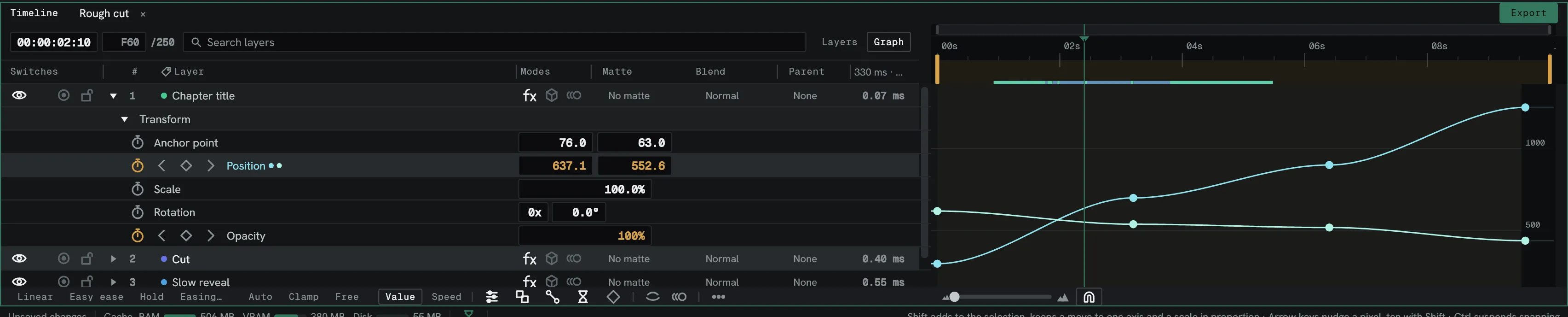
| Control | Does |
|---|---|
| Value | Shows the value graph: value against time. |
| Speed | Shows the speed graph: rate of change against time. |
| Acceleration | Shows the acceleration graph: how fast the speed changes. |
| Linear, Easy ease, Hold | Set the selected keyframes’ interpolation. |
| Easing… | Opens the easing editor on the selected keyframes. Value graph only. |
| Auto, Clamp, Free | Set the selected keyframes’ tangents: worked out from the neighbours, the same kept from swinging past them, or shaped by hand. |
| Break handles | Each handle of a keyframe moves without the other. Off each time Lumit starts. |
| Scope | Steps through Selected curves, Layer curves and Composition curves. Curves shown but not selected are dashed; a click selects one, and Shift-click or Ctrl-click adds it. |
| Auto fit | Automatically adjusts the vertical zoom to fit the curve on screen. Zooming the values with the wheel turns it off. |
| Fit selection | Zooms time and value to the selected keyframes, or to every curve with none selected. F does the same. |
A keyframe’s right-click menu holds Linear, Easy ease, Hold, Keyframe speed…, Copy ease, Paste ease, Join handles and Delete key.
With Edit ▸ Settings ▸ Timeline ▸ Editing ▸ Retime opens to Speed on, a Retime curve opens on the speed graph. See Retiming and speed.
Altering keyframe types
Section titled “Altering keyframe types”When working in the graph editor you can use the Linear, Easy ease, or Hold buttons to alter the change between frames. Linear has a constant rate of change between keyframes, and hold will hold the last keyframe until it reaches a new one.
Easy ease gives a keyframe two bezier handles, which by default move together, but holding Alt as a
handle drag begins allows them to act independently. These can be used to influence and change the rate of change between
keyframes.
Altering keyframes in both the value and speed graph will reflect in the other.