
Reference / Effects / Stylise
Updated
Pixel sort
Pixel sort is a Stylise effect.

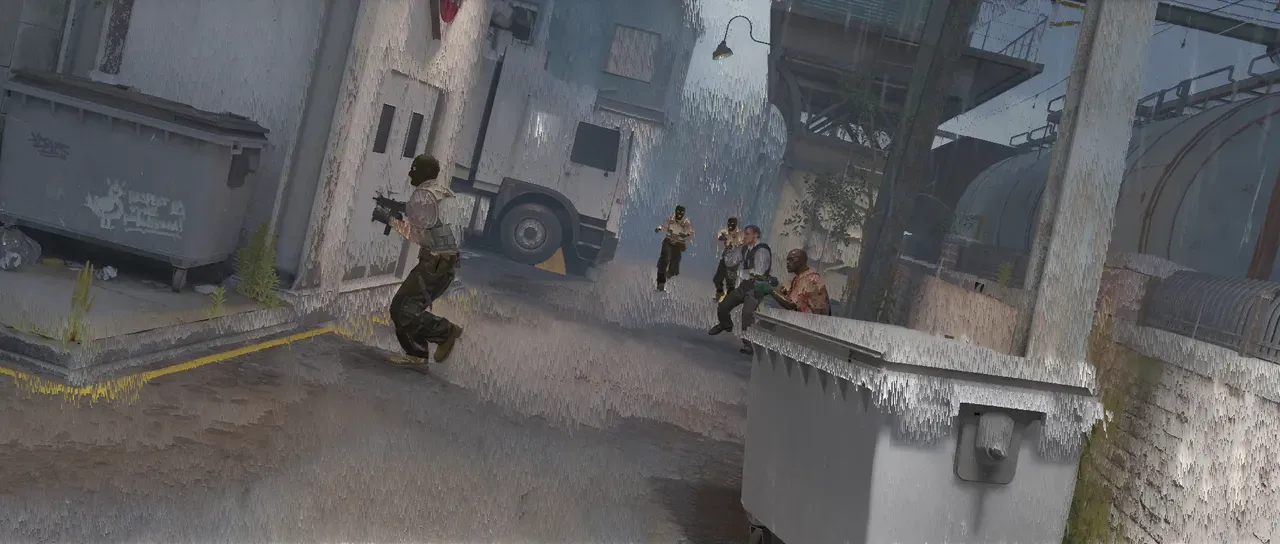
What it does
Section titled “What it does”Every run of pixels whose value falls between Min and Max is put in order along its own row or column. Pixels outside that band stay where they are. A run never grows longer than Maximum span length, and Random span offsets decides where each line’s runs are cut.
Parameters
Section titled “Parameters”| Parameter | Control | Range | Default | Unit |
|---|---|---|---|---|
| Sort by | Dropdown | Red · Green · Blue · Luminance · Hue · Saturation | Luminance | - |
| Direction | Dropdown | Horizontal · Vertical | Horizontal | - |
| Span mode | Dropdown | Sort · Stretch · Mirror | Sort | - |
| Reverse | Checkbox | On or off | Off | - |
| Min | Slider | 0 to 1 | 0 | - |
| Max | Slider | 0 to 1 | 1 | - |
| Maximum span length | Slider | 0 to 1000; up to 4096 | 300 | Pixels at composition size |
| Random offset scale | Slider | 0 to 1 | 1 | - |
| Random span offsets | Seed | Any whole number | A fresh random seed per instance | - |
| Mix | Slider | 0 to 100 | 100 | Per cent |
| Blend | Dropdown | Normal · Darken · Multiply · Colour burn · Linear burn · Darker colour · Add · Lighten · Screen · Colour dodge · Lighter colour · Overlay · Soft light · Hard light · Linear light · Vivid light · Pin light · Hard mix · Difference · Exclusion · Subtract · Divide · Hue · Saturation · Colour · Luminosity | Normal | - |
| Matte | Layer | Any layer in the composition | None | - |
| Invert | Checkbox | On or off | Off | - |
| Channel | Dropdown | Luminance · Alpha · Red · Green · Blue | Luminance | - |
In the Effect Controls panel:
- Matte says where the spans may form, alongside Min and Max: a pixel sorts only where the matte is at least half lit. Invert reads that matte inverted.
What each control does
Section titled “What each control does”- Sort by: which property a run is put in order by.
- Direction: Horizontal sorts along rows, Vertical down columns.
- Span mode: Sort writes the run back in order; Stretch gives the whole run the pixel the sort put at its far end; Mirror lays the run out from both ends inward.
- Reverse: orders every run the other way round.
- Min: the bottom of the band that sorts.
- Max: the top of it. Min above Max sorts nothing.
- Maximum span length: the most pixels one run may hold.
- Random offset scale: how far each line’s runs are shifted at random. At 0 every line’s runs start in the same place.
- Random span offsets: which offsets the runs take on each line.
- Mix: how much of the result replaces the original.
- Matte and Invert say where the runs may form, alongside Min and Max: a pixel sorts only where the matte is at least half lit. See Effects.
A value above 1 reads as 1, so a highlight brighter than white sits at the top of the band.