
Guides / The panels
Updated
Effects & presets
Every available effect can be found in this panel grouped by category. Within a category the effects are in alphabetical order, here and in the Effect menu. Presets saved to the application’s preset folder also appear at the top. The search also finds an effect by the After Effects or plugin name it is imported from, such as Deep Glow or S_Glow for Glow.
| Group | What it holds |
|---|---|
| Built-in | Effects that ship with Lumit. |
| Presets | Saved presets which can hold keyframes and multiple effects values. |
| A plugin’s own heading | OpenFX plugins, under the grouping each declares. |
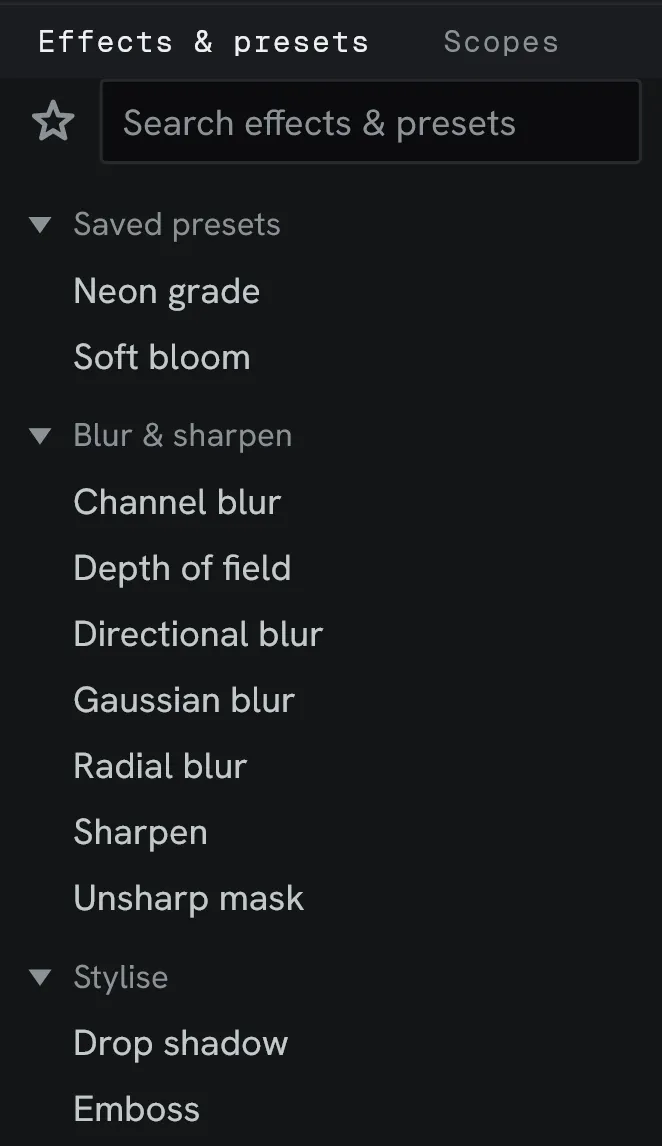
Apply one
Section titled “Apply one”Drag an effect or a saved preset onto a layer, or onto a clip in the Cut timeline. You can also select a layer and double-click the effect. With several layers selected, it goes on the primary layer only. The Effect menu does the same job.
After Effects presets
Section titled “After Effects presets”Settings ▸ General ▸ After Effects presets ▸ Import turns every .ffx in a folder,
and the folders inside it, into a Lumit preset listed here, grouped by those folders. A
preset with no effects, or named like one already in its group, is skipped. The same preset
left at the top by an earlier import moves into its group. Animation ▸ Apply animation preset and the
Effect Controls panel’s preset load also open an .ffx directly.
| In the preset | Arrives as |
|---|---|
| An effect Lumit has | That effect, with its values and keyframes |
| A pseudo effect | Custom controls, under the same name |
| Any other effect | A placeholder that keeps its values and draws nothing |
| An expression | The same expression |
| An expression over keyframes | The keyframes |
A layer’s own transform, masks and text animators in a preset are not read.
Groups
Section titled “Groups”Saved presets are grouped by the folders they sit in inside the preset folder. Right-click Saved presets or a group for New group, Rename… and Delete. Deleting a group deletes the presets in it, and asks first when there are any. Drag a preset onto a group to move it there, or right-click it and choose Move to.
Favourites
Section titled “Favourites”If there’s particular effects or presets you use regularly, you can save them as favourites by clicking the star next to their name. A row that is not a favourite shows its star while the pointer is over it. Toggling the favourites by the search bar displays only favourited items.