
Reference / Effects / Generate
Updated
Pick points
Pick points is a Generate effect.
What it does
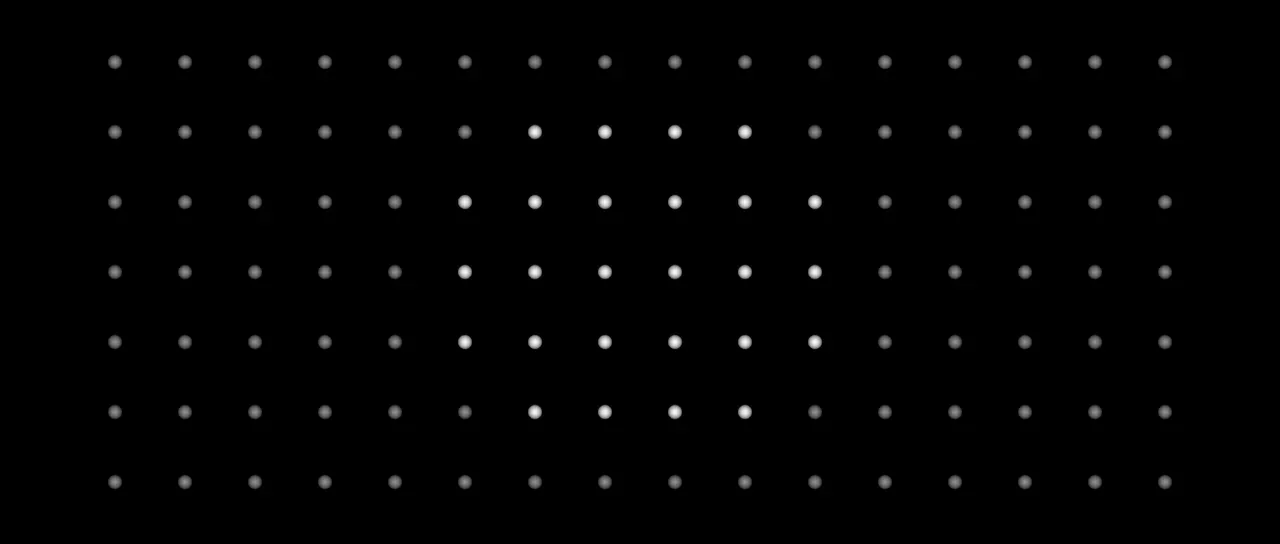
Section titled “What it does”Reads the stream on its Points socket, keeps some of its points and drops the rest. A Pattern gives each point a number from 0 to 1, and the point is kept while that number lies between From and To.
The kept points go out on its own Points socket and are drawn as discs. They keep their identity, and a Trail below still follows them.
A point can be marked picked, and it carries a number. The effects below can act on only the picked points, through their Apply to row, or read the number to choose a clone layer, a time offset or an order. Every point is picked until a Pick points says otherwise, and its number is its place in the stream until an effect sets it. Result can mark the kept points as picked and drop nothing. A point can carry more numbers and groups under names. See Names.
With the Image pattern its points depend on a picture. The points effects below it in the same layer’s stack can read them. Points sample cannot, and neither can Layer points from another layer.
Two Pick points reading one producer, with Every nth at 2 and Offset at 0 and 1, split its points between two Clone to points.
Parameters
Section titled “Parameters”| Parameter | Control | Range | Default | Unit |
|---|---|---|---|---|
| Result | Dropdown | Drop the rest · Pick · Add to picked · Remove from picked · Keep in picked | Drop the rest | - |
| Group name | Text | A short line of text | Empty | - |
| Pattern | Dropdown | Index · Random · Noise · Distance · Age · Constant · Across · Down · Image · Picked · Number · Stripes · Checker · Waves | Random | - |
| From | Slider | 0 to 100 | 0 | Per cent |
| To | Slider | 0 to 100 | 100 | Per cent |
| Pattern › Invert | Checkbox | On or off | Off | - |
| Noise scale | Slider | 10 to 1000; down to 1 and higher | 200 | Pixels at composition size |
| Noise speed | Slider | 0 to 5; higher | 0 | - |
| Centre X | Slider | 0 to 3840; any value by typing | 960 | Pixels at composition size |
| Centre Y | Slider | 0 to 2160; any value by typing | 540 | Pixels at composition size |
| Radius | Slider | 0 to 2000; higher | 400 | Pixels at composition size |
| Number range | Slider | 1 to 100; down to 0.001 and higher | 1 | - |
| Name | Text | A short line of text | Empty | - |
| Spacing | Slider | 1 to 1000; down to 0 and higher | 100 | Pixels at composition size |
| Angle | Dial | Any angle; snaps every 15° while a modifier is held | 0° | Degrees |
| Width | Slider | 0 to 100 | 50 | Per cent |
| Wave | Dropdown | Sine · Triangle · Square · Sawtooth | Sine | - |
| Rings | Checkbox | On or off | Off | - |
| Image layer | Layer | Any layer in the composition | None | - |
| Map placement | Dropdown | As placed in comp · Stretch to fit · Centre | As placed in comp | - |
| Every nth | Slider, whole numbers | 1 to 100; up to 1000000 | 1 | - |
| Offset | Slider, whole numbers | 0 to 100; up to 1000000 | 0 | - |
| Feather | Slider | 0 to 100 | 100 | Per cent |
| Seed | Seed | Any whole number | A fresh random seed per instance | - |
| Mix | Slider | 0 to 100 | 100 | Per cent |
| Blend | Dropdown | Normal · Darken · Multiply · Colour burn · Linear burn · Darker colour · Add · Lighten · Screen · Colour dodge · Lighter colour · Overlay · Soft light · Hard light · Linear light · Vivid light · Pin light · Hard mix · Difference · Exclusion · Subtract · Divide · Hue · Saturation · Colour · Luminosity | Normal | - |
| Matte | Layer | Any layer in the composition | None | - |
| Invert | Checkbox | On or off | Off | - |
| Channel | Dropdown | Luminance · Alpha · Red · Green · Blue | Luminance | - |
In the Effect Controls panel:
- Pattern groups Pattern, From, To, Invert.
- Count groups Every nth, Offset.
- Point groups Feather.
- Group name is editable while Result is anything but Drop the rest.
- Matte is an input to an effect, scaling the strength. Invert inverts the mattes for calculating strength.
What each control does
Section titled “What each control does”- Result: what becomes of the points the rows below keep. Drop the rest removes the others. Pick removes nothing and marks the kept points as picked. Add to picked, Remove from picked and Keep in picked remove nothing either. They add the kept points to what was picked already, take them from it, or keep only them in it.
- Group name: the name the marks are written under, 1 for a point in the group and 0 for the rest. Add to picked, Remove from picked and Keep in picked then start from that group. Left empty, the points are marked as picked. See Names.
- Pattern: where a point’s number comes from. Index is its place in the stream, 0 for the first point and 1 for the last. Random is a roll of its own, the same every frame. Noise is a smooth noise read at its position. Distance is how far it is from the centre, reaching 1 at Radius. Age is how far through its life it is. The points of Particulate and Track points age, and the rest do not. Constant is always 1. Across runs from 0 at Radius left of the centre to 1 at Radius right of it, and Down does the same from top to bottom. Image is how bright the picture under the point is. Picked is 1 for a picked point and 0 for the rest. Number is the number the point carries over Number range, held to 0 to 1. Stripes is 1 inside a band and 0 between. Checker is 1 and 0 in alternate squares. Waves is a wave that repeats over space and can travel over time.
- From and To: the range of the pattern’s number that is kept. On Random, To is the share of the points kept. On Distance they keep a disc or a ring round the centre. On Index, To rising from nought brings the points on one at a time.
- Invert, under Pattern: swaps the kept points and the dropped ones.
- Seed: which roll, or which noise. It shows for Random and Noise.
- Noise scale: how far apart two points must be to differ. It shows for Noise.
- Noise speed: how fast the noise changes over time, and how many waves pass a point each second. At nought they hold still. It shows for Noise and Waves.
- Centre X and Centre Y: the place Distance, Across and Down are measured from, and where the stripes, squares and waves start.
- Radius: how far from the centre the number reaches 1. It shows for Distance, Across and Down.
- Number range: the number that reads as 1. A point’s number is divided by it, and with word numbers 0 to 4 a range of 4 spreads the words from 0 to 1. It shows for Number.
- Name: which of a point’s numbers the Number pattern reads. Left empty, it is the number the point carries. It shows for Number.
- Spacing: how far it is from one stripe, square or wave to the next. It shows for Stripes, Checker and Waves.
- Angle: how far the stripes and squares are turned about the centre, and the way the waves travel. At 0 the stripes lie across and the waves travel to the right. Rings take no notice of it.
- Width: how much of each Spacing a stripe fills. It shows for Stripes.
- Wave: the shape of each wave. It shows for Waves.
- Rings: the waves run out from the centre as rings, not across as bands.
- Image layer: the layer whose picture the Image pattern reads. Unset reads this effect’s own input picture. It shows for Image.
- Map placement: where the Image layer’s picture sits on this layer. As placed in comp reads it where that layer sits in the composition. Stretch to fit stretches it over this layer. Centre centres it at its own size. An effect saved before this row existed stays on Stretch to fit.
- Every nth: keeps one point in that many, counted by id. A particle stays in or out for its whole life.
- Offset: which point of each run is kept.
- Feather: how soft the edge of a drawn disc is.
- Mix: how much of the drawing lands on the picture. At nought the points are still handed on.
- Matte and Invert drive the strength of the effect from another layer’s brightness. See Effects.