
Reference / Effects / Distortion
Updated
Warp
Warp is a Distortion effect.

What it does
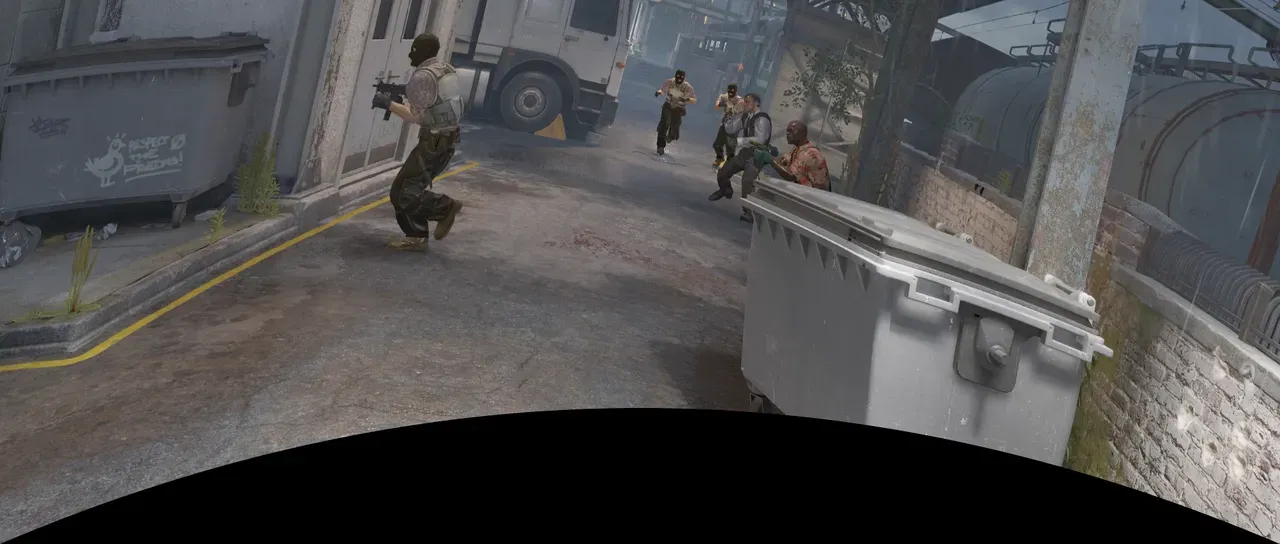
Section titled “What it does”Multiple bend options, each of which warps the image in a different way.
Parameters
Section titled “Parameters”| Parameter | Control | Range | Default | Unit |
|---|---|---|---|---|
| Style | Dropdown | Arc · Arc upper · Arc lower · Arch · Bulge · Flag · Wave · Fish · Rise · Fisheye · Inflate · Squeeze · Twist | Arc | - |
| Bend | Slider | -100 to 100 | 50 | Per cent |
| Horizontal distortion | Slider | -100 to 100 | 0 | Per cent |
| Vertical distortion | Slider | -100 to 100 | 0 | Per cent |
| Mix | Slider | 0 to 100 | 100 | Per cent |
| Blend | Dropdown | Normal · Darken · Multiply · Colour burn · Linear burn · Darker colour · Add · Lighten · Screen · Colour dodge · Lighter colour · Overlay · Soft light · Hard light · Linear light · Vivid light · Pin light · Hard mix · Difference · Exclusion · Subtract · Divide · Hue · Saturation · Colour · Luminosity | Normal | - |
| Matte | Layer | Any layer in the composition | None | - |
| Invert | Checkbox | On or off | Off | - |
| Channel | Dropdown | Luminance · Alpha · Red · Green · Blue | Luminance | - |
In the Effect Controls panel:
- Matte scales Bend and both distortions per pixel: white bends the full amount, grey less, black not at all. Invert reads that matte inverted.
What each control does
Section titled “What each control does”- Style: which bend.
- Arc bows the whole picture one way.
- Arc upper and Arc lower bow only the top or bottom edge.
- Arch bows top and bottom apart, enlarging the middle.
- Bulge swells the middle on both axes.
- Flag puts one full wave across the width.
- Wave is the same as Flag, with the top and bottom edges out of step.
- Fish bows the sides out and tapers the ends.
- Rise lifts the picture diagonally.
- Fisheye magnifies outward from the middle and rounds corners.
- Inflate is the same as Fisheye, with a softer, rounder falloff.
- Squeeze crowds rows toward the middle.
- Twist turns the top one way and the bottom the other.
- Bend: the amount to warp by.
- Horizontal distortion: tapers the picture between its left and right edges.
- Vertical distortion: tapers the picture between its top and bottom edges.
- Mix: how much of the result replaces the original.
- Matte and Invert drive the strength of the effect from another layer’s brightness; see Effects.