
Guides / Using Lumit / Projects and media
Updated
Projects
A project is the complete document: assets and compositions, together with
their settings. It is saved as a .lum file.
The project file stores references to footage files, and Lumit never modifies those files. A packed project also carries the files themselves.
Save and open
Section titled “Save and open”- File ▸ Save saves the project.
- File ▸ Save as… saves to a new path. If already saved, it creates a new copy at the location.
- File ▸ Open project… opens a
.lumfile, Open recent lists the last few. - File ▸ New starts an empty project, or a copy of the template chosen in Settings. Footage packed inside a template is not unpacked. The copy is unsaved and is a new project of its own. A template that cannot be read gives an empty project and the notice The project template would not open, so the new project is empty. Close project never uses the template.
Opening a project that another Lumit has open brings that Lumit’s window forward.
With unsaved changes, Lumit asks before the project goes: on New, Open project…, Open recent, Close project, an After Effects import, joining a shared project, and on quitting. Save saves first, Discard drops the changes, and Cancel keeps the project open. If the save is cancelled or fails, the project stays open.
Packed projects
Section titled “Packed projects”A packed project carries its footage inside the .lum file. It opens on a machine that has
none of the original files. The commands are under File ▸ Packed project file.
- Pack project file saves the project with every footage item’s file inside it. Footage imported afterwards is not packed until the command is run again.
- Pack automatically packs on every save.
- Unpack project file writes the packed footage into a
mediafolder beside the project and saves the project without it. A footage item whose original file is still on disk goes back to reading that file, and nothing is written for it.
A packed footage item reads its original file while that file is on disk and unchanged. Otherwise it reads the packed copy, which is copied into Lumit’s cache when the project opens. A file that has changed on disk since it was packed is packed again on the next save.
Shared projects
Section titled “Shared projects”A shared project is edited by several people at once. One person, the host, shares it from their computer and the others join as guests. Guests connect to the host’s computer directly, over a local network, the internet or a VPN, or through a relay. A shared project can also be kept online.
File ▸ Multi-edit… opens the Multi-edit window, which has two pages.
- Share this project: Start sharing shares the open project and shows its invite link.
- Join a project: an invite link is pasted, and Join opens the host’s project in place of the open one.
A click on an invite link in a browser opens Lumit on Join a project with the link filled in.
The host and its guests run the same version of Lumit. A nightly and a stable build cannot share a project. A shared project holds at most 16 people, the host included.
While a project is shared, a Shared button sits on the bottom strip and opens the same window. It lists everyone in the project. The host can Remove a guest, and Stop sharing ends it for everyone. A guest has Leave.
An invite link holds every address the host can be reached at and a key. Anyone who has it
can join and edit until the host stops sharing. A link is not drawn until it is shown. Show
asks before it shows one, and Copy link copies it without showing it. The part of the link
after the # is not sent to lumitlab.com.
Password on Share this project sets a password that every guest types as well as having the link. It is drawn as dots until Show is pressed. Join a project shows a Password row for a link that needs one. A wrong password and a host that is not there give the same message. A project shared again keeps its password unless another is typed.
A guest tries every address in the link at once and keeps the one that answers with the key. The line under the link says who it works for.
| Line | Who can join |
|---|---|
| Anyone with this link can join. | Anyone. The host’s router opened the port, or a relay is in use. |
| Only people on your network can join. | People on the host’s network. The router refused, has no address of its own on the internet, or was not asked. |
Advanced holds the rest.
- Internet: when ticked, Lumit asks the host’s router to open the port when sharing starts, and to close it when sharing stops. It is ticked by default.
- Port: the port the host listens on, 47856 by default.
- Relay: the address of a relay, for guests the router does not let in. It is set before sharing starts.
- Extra address, while sharing: one more address of the host’s computer to add to the link, such as its address on a VPN. It is an IP address or a name, without a port.
Relays
Section titled “Relays”A relay is a server that passes edits between a host and its guests when neither can reach the other. Both connect out to it. What passes through is encrypted with the invite’s key, which the relay is never given. The relay’s owner can see the addresses that connected and how much was sent.
Lumit relay on Share this project uses the relay Lumit itself runs. It is part of Lumit Pro: the host needs it, and guests do not. It is used when Relay is empty.
Any other relay is used only when its address is in Relay. It
is the lumit-relay program from Lumit’s source, run on a server its owner controls:
cargo run --release -p lumit-relay, with a port number after it to listen on a port other
than 47857. A second number is a speed in kilobytes a second that each connection is held
to after its first 16 MB, which lets edits through and slows footage. A guest is sent
through the relay only when no address of the host answers.
An edit made by one person appears for everyone. Two people can work on the same layer at once: a change to one effect, mask or property leaves the others as they are. Where two people change the same value, the later change stands. Undo takes back a person’s own edits, and skips a step that another person has changed since.
The host’s project file is the one that is saved. A guest’s copy is a new, unsaved project.
Each person has a colour, and what they have in hand is marked in it.
| Panel | What is marked |
|---|---|
| Project | A dot on a composition they have open, and a bar on the items they have selected. |
| Timeline, Audio timeline | A bar on the layers and property rows they have selected, a ring round the keyframes they have selected, in the layer view and the graph view, and a line at their playhead. |
| Effect controls | A bar on an effect they have picked and on a row they have pressed. |
| Node graph | A ring round a box they have picked. |
| Viewer | Their pointer. |
A row out of sight in a layer that is twirled shut is marked on the layer. Two people on the same row or keyframe both show.
The eye on a person’s row in the Multi-edit window follows them: the open composition and the playhead go where theirs go. Esc, or moving the playhead, stops it.
A guest chooses a Footage folder when joining, and each footage item is matched to a file in it by name and then by content. An item with no match can be relinked, or fetched from someone who has it.
Footage someone has not got
Section titled “Footage someone has not got”A footage item used in a composition that is not on a computer is sent to it as a stand-in: the whole clip at its own size and length, with its sound, compressed hard. The computer reads the stand-in as if it were the file. The row wears a stand-in badge in the Project panel. A still or a sound file is sent as it is.
Whoever has the original makes the stand-in when it is first asked for, and the host passes it on to a guest who asks. A stand-in is kept and is not sent twice. A transfer that is cut off carries on from where it stopped.
On a footage row nobody here has, the menu has Get a stand-in and Fetch the original, which fetches the file itself and gives its size. A fetched original is checked against the project’s record of the file.
Advanced in the Multi-edit window holds the rest. The two limits are also in Settings ▸ General ▸ Shared projects.
- Send stand-ins of my footage: when unticked, this computer sends none of its own footage.
- Get stand-ins of missing footage: when unticked, nothing is fetched until it is asked for from the menu.
- Stand-in size (Full, Half, Quarter) and Stand-in frames (All, Half, Quarter): how much smaller than the footage the stand-ins this computer makes are. A frame left out shows the one before it. A smaller stand-in is still read at the original’s size and length. Interlaced footage keeps its size.
- Upload limit and Download limit: the fastest footage is sent and fetched, in kilobytes a second. 0 or empty is no limit. Edits are not limited.
While footage is crossing, the Multi-edit window lists each transfer and how far along it is.
Exporting without the originals
Section titled “Exporting without the originals”The export dialogue shows Missing footage when the composition uses footage the computer has no original of.
| Choice | What happens |
|---|---|
| Fetch the frames this export uses | Whoever has each clip sends the run of frames the export reads, at delivery quality, and the export starts when they have arrived. The sound comes with them. |
| Fetch the originals | The files themselves are fetched first. The size shown is their total. |
| Export on someone’s computer | A person who has every clip is asked to export. Their Lumit asks them first, exports, and sends the file back to the path chosen here. |
| Export from stand-ins | The export reads the stand-ins as they are. |
The frames are a re-encode of the original, as H.264 at 4:2:0 and eight bits, not a copy of its bytes.
When the host goes away
Section titled “When the host goes away”A guest that loses the host keeps working. When the host is reachable again the guest’s edits are merged into the host’s project. An edit to something another person also changed is held back and listed in the Conflicts window, where each is settled with Keep mine or Keep theirs. An edit to something that no longer exists is dropped.
A guest’s saved copy that is closed while the host is away is still a guest when it is opened again. It opens with the edits made while away that were saved, or all of them if Lumit crashed, looks for the host, and merges when it finds it. Leave ends that. A conflict not settled before the copy is closed is listed again when it is opened.
Only the file a copy was last saved as opens as part of the shared project. Another file with the same history, such as the project saved under another name or copied by hand, opens as a project of its own.
A host that closes the project, or Lumit, without Stop sharing keeps its invite. When it opens the project and shares it again on the same port, the guests who are waiting come back by themselves and their edits are merged. If the host’s address has changed, a guest pastes the new invite under New invite in the Multi-edit window.
A host keeps every edit made since its last save, its guests’ included. If it closed without saving, or Lumit crashed, Start sharing puts those edits back. Closing a host project that was never saved stops sharing.
Stop sharing finishes with the invite, and sharing again makes a new one. Remove replaces the invite. The removed guest keeps its copy, the invite it holds stops working, and the guests still connected carry on. A guest that had lost the host at that moment needs the new invite.
Keeping a shared project online
Section titled “Keeping a shared project online”A shared project can be kept online, so nobody’s computer has to be on for the others to work. It is part of Lumit Pro: the host needs it, and guests need no account.
| Action | How |
|---|---|
| Keep the open project online | Tick Keep online on Share this project, then Start sharing. |
| Join | An invite link pasted on Join a project, then Join. |
| Let someone look and not change | Turn on Invite to look, for the host, and send them that link. |
| Leave a note | The line at the top of Activity, then Send. |
| Open it again | Open the saved project file. |
| See who edited it | Activity in the Multi-edit window. |
| Remove someone | Remove on their row, for the host. |
| Stop | Stop keeping online, for the host. A guest has Leave. |
| Stop one whose file is gone | Stop keeping online on Settings ▸ Account, for the host. |
Invite to look lets someone see the project and follow people, and not edit. Up to eight people can look at once. It never asks for the password: with one set, either link shows the project, and editing still needs the password.
While someone changes a property, its row is held for them on every other computer. It is dimmed, with their name, until they let go.
The first line of the window says how the computer stands with the server, and the bottom strip says the same.
| Line | Meaning |
|---|---|
| In step | Every edit is shared. |
| Reconnecting | The server cannot be reached. Edits wait on the computer and are merged later. |
| Invite replaced | The host made a new invite. Paste it under New invite. |
| On hold | The host’s Lumit Pro has ended. Edits wait on each computer. |
| Nearly too large | The project is over 95 MB, footage not counted. Edits stop unless it gets smaller. |
| Too large | No more edits are shared. The host stops keeping it online, makes it smaller and keeps it online again. |
| On Lumit 0.6.0, Waiting for the host, Update needed | See After an update. |
Activity lists who edited the project and where, newest first. Edits made while the computer was away are listed first.
A note is written on the line at the top of Activity. It carries the open composition and the playhead’s time, and shows as a flag on that composition’s time ruler. A note holds 500 characters and cannot be changed. Its writer and the host can take it down.
When edits made while away are dropped or left as conflicts, Open my copy opens the project as it was on the computer just before.
Remove takes a person out and replaces the invite link. Anyone who is away needs the new one from the host.
Stop keeping online deletes the project and its footage from the server. Everyone keeps their copy.
Settings ▸ Account lists every project the account keeps online under Kept online, with Stop keeping online for each.
Stand-ins of the footage are kept online too.
- Keep the originals online, in the host’s window, also sends the original files.
- Fetch the original, on a footage row’s menu, fetches one.
Footage counts against the host’s Lumit Pro storage.
The project and its footage are encrypted before they leave the computer. The key is in the invite link and is never sent to the server.
When the host’s Lumit Pro ends, the project can still be opened. One that nobody opens for 90 days after that is deleted from the server.
After an update
Section titled “After an update”A project kept online is on the version of Lumit that last stored it.
| Computer | What happens |
|---|---|
| The host’s, on a newer Lumit | Lumit asks whether to move the project forward. Not now leaves it, and the Multi-edit window offers the move again. |
| A guest’s, on a newer Lumit | The copy waits, and joins by itself when the host has moved the project forward. |
| Anyone’s, on an older Lumit | The window names the version to update to. |
Edits made while waiting are kept and merged afterwards. A move cannot be undone.
Autosave
Section titled “Autosave”Lumit keeps rotating autosave copies in an autosaves/ folder beside the project. They
are written on an interval while the project has unsaved changes, and again before risky
operations such as starting an export. The interval and how many copies are kept are both
under Settings, on the Autosave page; turning the interval to zero switches the timer off.
A project that has not changed since its last save or autosave writes nothing.
Crash recovery
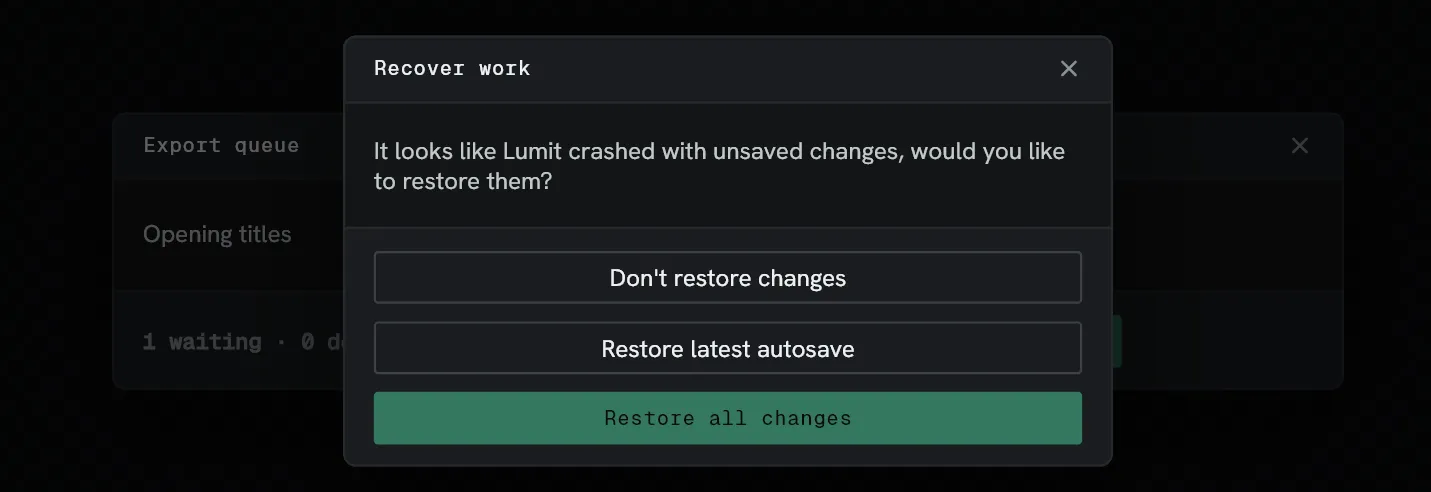
Section titled “Crash recovery”Between saves, Lumit also records every edit. After a crash, open the project and Lumit asks whether to restore them. File ▸ Recover… asks again later. The dialogue has three choices:
| Choice | Recovers |
|---|---|
| Restore all changes | Everything up to the moment things stopped. |
| Restore latest autosave | The project as it was at the last autosave. |
| Don’t restore changes | Nothing. The project stays as it was opened. |
The command is live once the project has been saved to a file, and does nothing while there is no autosave beside it. After a crash, an answer other than Restore all changes throws the recorded edits away.